Photoshop has a new AI-powered fix for your compositional mistakes


Photoshop has matched its growing number of AI-powered rivals with a new feature that lets you expand images with a few clicks.
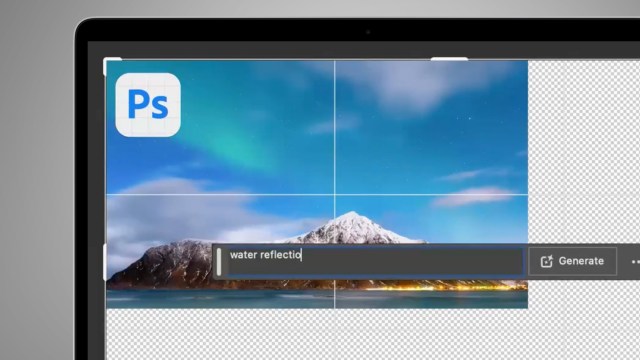
Like the existing Generative Fill, the new Generative Expand feature – available to Photoshop (Beta) users – lets you extend an existing image in any direction, with the software filling in the extra space either automatically or based on the guidance of your prompts.
If you already know how to use Generative Fill in Photoshop, then you’ll quickly be able to pick up Generative Expand. It’s based on the same AI generative tech, but instead works with the Crop tool (rather than the Marquee or Lasso tools).
In fact, it’s a bit like using the Crop tool in reverse. Rather than cropping images smaller, the feature lets you fix compositional mistakes or effectively switch to a wider angle view. You just select the Crop tool from the toolbar, go to the Fill menu in the Options bars, and select Generative Expand.
Once you’ve done that, it’s a case of dragging the corner and side handles to the size you want, then clicking the ‘Generative Expand’ button. You can leave Photoshop to guess what it should added to the image (which it’s very good at, based on our experiences with Generative Fill) or add a text prompt to give it a helping hand.
From the demos so far, it looks like another very useful AI feature, with photo-realistic results. Like its rivals – for example, Midjourney’s ‘outpainting’ feature – there is are potential mistakes and artifacts, but Photoshop also gives you three variations of your expanded image to choose from.
Adobe now has a full guide to using Generative Expand – and if you aren’t already using Photoshop (Beta), you can download it by going to your Creative Cloud download app and clicking ‘Beta apps’ on the left-hand side.
Playing AI catchup
A whole range of apps have been offering image expansion, or ‘outpainting’ as Midjourney calls it, for a while now – so it may look like Photoshop is a bit behind the curve here.
But with the launch of Firefly – Adobe’s family of tools to take on Midjourney and Dall-E – the company has shown it’s keen to tread carefully in the world of AI image generation. This is understandable given the emergence of class-action lawsuits against the likes of Midjourney from artists, who claim some models are based on copyrighted works.
Adobe has been keen to stress that Firefly-powered tools like Generative Expand and Fill have been trained on Adobe Stock images, openly-licensed content, or public domain content where the copyright has expired.
This means that pros who uses the likes of Photoshop can use its generative AI tools without any concerns about copyright infringement, even if those tools are a bit slower to roll out than on some rivals.
Google is also happy with Adobe’s more ethical approach to AI, with the search giant announcing back in May that it would be integrating Firefly image generation into its Bard chatbot. So far, that still hasn’t rolled out, so we’ve asked Adobe for an update on when that will happen and will update this article when we hear back.
Photoshop has matched its growing number of AI-powered rivals with a new feature that lets you expand images with a few clicks. Like the existing Generative Fill, the new Generative Expand feature – available to Photoshop (Beta) users – lets you extend an existing image in any direction, with the software…
