Google has spent the last half-decade cruelly teasing me with its to-do list app. Google Tasks first launched as a standalone app in 2018, and Google seemed to have big plans for its task manager tool. And then… nothing. Actually, worse than nothing: Google launched and developed so many disconnected reminder-setting products that it became nearly impossible to figure out where your tasks were, what they are, and how you were supposed to get anything done.
I almost can’t believe it, but Google Tasks is finally kind of good

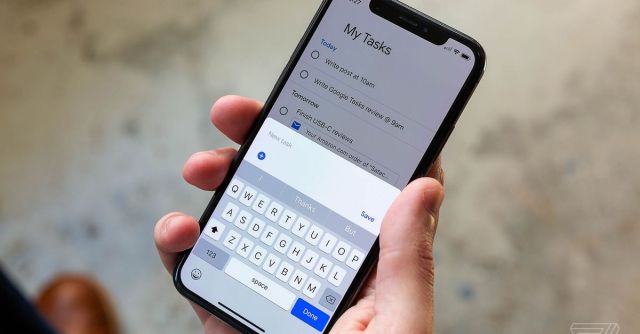
But in the last couple of months, something miraculous happened: Google actually fixed it. The company spent this spring combining all its many Tasks and Reminders products into a single tool that is accessible almost everywhere and via almost any Google product. There are still some holes in the system and still a lot of task management features missing. But Google Tasks also has some unique upsides, and for the first time ever, I’m actually using it and enjoying it.
The big change Google made was to funnel all reminders into Google Tasks. So now if you say to Google Assistant, “Remind me to switch the laundry in an hour,” that goes into Google Tasks. Add a task from your Nest Hub Max, and it shows up in Tasks. If someone assigns you a task in a Google Doc, it’ll appear in your Tasks list with a link to that document. Creating a task in Google Calendar? It shows up in Google Tasks, too. Where there used to be several back-ends, now there is only Google Tasks.
This is an unequivocally better idea than whatever chaos Google had before, not to mention the obviously correct answer — it’s almost bizarre that it took Google this long to make such a simple change. It never made sense that “Remind me to bring in the trash bins tonight” would go anywhere but Tasks. But hey! Now it goes to Tasks.
Google Tasks isn’t remotely close to being a powerful project management tool on par with Todoist or some of the other apps out there. Even Apple’s Reminders app can do more. It’s much closer in spirit to a paper to-do list — just a bunch of things written down that you need to get done.
But Google has one crucial thing going for it: ubiquity. Unlike the piece of paper I scribble my lists on and then lose or the apps I set up and then forget to check for days at a time, Google Tasks is effectively unavoidable if you use Google products. It’s in the sidebar of Gmail, Docs, and other Google products, tasks show up right into Google Calendar, the mobile app is simple but works fine, and I love being able to bring up Google Assistant and just say, “What are my tasks for today?”
Google has one crucial thing going for it: ubiquity
That kind of integration helps make sure you don’t miss stuff on your list, but even more importantly makes it easy to put stuff on the list. I am perpetually swinging between ultra-powerful to-do list apps that turn out to be too complicated and tools that don’t do much but at least make it easy to add to my list. Google Tasks is all the way at the latter end of that spectrum. Plus, opening Assistant and saying, “Remind me in three days to pick up my dry cleaning,” is the best capture tool I’ve ever found. A second later, that task is in my list and on my calendar and right there next to my inbox. I might even remember to do it now.
The only remaining holdout is Google Keep, which is still very weird: you can add a reminder to a note Keep, but it doesn’t show up in Tasks. This integration could be great — Tasks could even grab all the checklist items in your Keep notes, add due dates, and so on — but I can at least live with the idea that I have a notes app and a tasks app, and they’re separate things. Besides, Keep is at the top of the list of “apps I’m not even sure Google remembers it makes,” so I’m not shocked it’s not part of the new setup.
My main ongoing gripe is the same one I have for just about every other Google product: everything’s too complicated if you have more than one Google account. There’s simply no way to see all your tasks in one place if you have multiple accounts, which makes it hard to manage everything. Tasks really ought to have a view akin to the Gmail app’s “All inboxes” feature, but all you get on mobile is quick switching between accounts. I’d also like to have a way to subscribe to Tasks, like I subscribe to things in Google Calendar, which is how I’m currently able to see my work and personal events in one place. But no dice there, either. You’re basically stuck with identical but totally separate to-do lists for each of your accounts.
History says that this is the last time Google will care about Tasks for a while, none of the remaining problems will get fixed for another half-decade, and it’ll never become the true productivity powerhouse it could be. Even if that’s the case, it’s finally an app worth using. It’s not a power-user tool, but it doesn’t need to be. It just needs to be a place you can dump everything without worrying you’ll never find it again. In some ways, having a bunch of reminder tools is actually worse than having none. Google finally just has one.
Well, two. I don’t think I’m ever getting the perfect Keep integration I’ve been waiting for. But I’ll take what I can get.
Google has spent the last half-decade cruelly teasing me with its to-do list app. Google Tasks first launched as a standalone app in 2018, and Google seemed to have big plans for its task manager tool. And then… nothing. Actually, worse than nothing: Google launched and developed so many disconnected…
