For my money, you simply cannot get a better electrocapacitive keyboard than the Bauer Lite with a DynaCap kit.
This DIY kit turned my favorite mechanical keyboard into my favorite electrocapacitive keyboard

[Editor’s note: Huh?]
You can get a nicer EC keyboard, without having to build it yourself, by simply spending $3,600 on a Norbauer Seneca. Or you can get a Happy Hacking Keyboard or a Realforce for south of $300, also without having to build it yourself, with genuine Topre switches, Bluetooth if you want it, and decent — but not great — remapping capability.
Or, for about $250, a set of keycaps, and a couple of hours of assembly, you can design a Bauer Lite in any of a zillion color combinations and use DynaCap parts to turn it into a fully remappable EC keyboard that feels like Topre while still being compatible with the vast world of aftermarket keycaps. Doesn’t that sound nice?
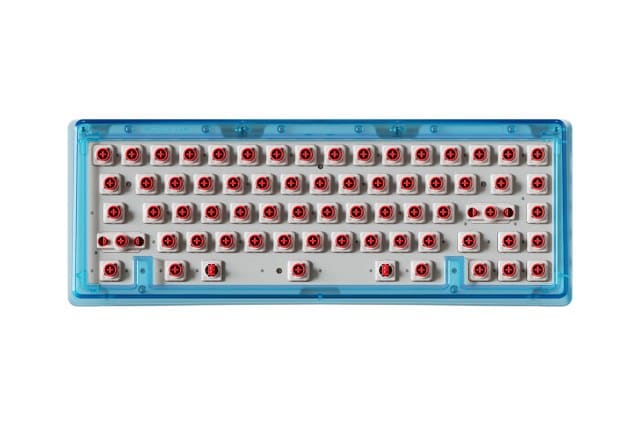
$136
A 65 percent gasket-mounted wired mechanical keyboard kit. Use the Design Lab to customize its top, bottom, switchplate, and accent colors, plate materials, and mechanical or electrocapacitive PCBs. (Switches, stabilizers, and keycaps sold separately)

$122
A bundle of parts to convert a mechanical keyboard into an electrocapacitive one. Use a 60/65% bundle with a 7u space bar for a Bauer Lite you’ve configured with a Dynacap plate and EC65X PCB, or the DynaPak, which includes the plate and PCB, if you are converting one you already own.
DynaCap is a system of third-party, Topre-compatible parts from Clever Keebs that make it (relatively) easy and (relatively) cheap to create new electrocapacitive keyboards, convert an existing mechanical keyboard to EC, or modify a Topre board to use standard keycaps. The full DynaCap stack consists of sliders, housings, stabilizers, domes, springs, silencing rings, and plate gaskets (required only if you’re converting a Topre board). All you need is a compatible PCB and switch plate to turn any mechanical keyboard into an electrocapacitive one that works with MX keycaps.
Stop me if you’ve heard this part before. Topre keyboards rule because their electrocapacitive switches give them an unmatched, top-heavy tactile bump that you can’t get anywhere else. Unfortunately, there are only a handful of actual Topre keyboards still in production, in only four layouts: full-size, TKL, a new nonstandard 75 percent board, and the Happy Hacking Keyboard. And except for a couple of okayish Realforce gaming keyboards, they’re not compatible with the MX mount style used by pretty much every keycap set ever. This is a big problem for a small number of people, and some of them have tried to fix it.
It’s not as simple as just swapping the sliders from Topre to MX. MX-compatible keycaps are designed to fit over Cherry-MX-style housings; if you use MX sliders on Topre housings, some keycap profiles on some rows will bang into the housings on the way down. Both Ryan Norbauer and Clever also redesigned their switch housings to accommodate. Norbauer’s are radically different to the point where they’re incompatible with Topre switchplates, but that’s moot because you can only get them on a Norbauer board. See above re: $3,600.
DynaCap parts, on the other hand, are available à la carte and are intercompatible with Topre parts. DynaCap sliders fit into Topre housings and vice versa; DynaCap domes and springs work with Topre boards and vice versa. If you just want to make a Topre board work with MX keycaps, you only need the sliders, silencing rings (optional), housing gaskets, and housings (unless you’re converting a board with an integrated switchplate).

But the real magic comes from having the full stack. Paired with a PCB and switchplate, you can use DynaCap to turn a keyboard designed for MX switches into one that’s very much like a Topre board, and even better in some ways. DynaCap is working with keyboard vendors to sell DynaPaks — kits that include all the parts needed to convert your keyboard — and several upcoming keyboard group buys include DynaCap options.
The DynaCap system is designed by Clever Keebs, and manufactured and sold through Omnitype, and one of the first DynaPaks available is for Omnitype’s Bauer Lite keyboard. This is incredibly convenient for me. I own a Bauer Lite. I love the Bauer Lite. It’s a 65 percent keyboard kit with a ton of different translucent color combinations and a layout that combines the best features of the Happy Hacking Keyboard and my beloved and now-discontinued Leopold FC660C: split backspace and arrow keys. And now, with DynaCap, it can also feel like those two Topre keyboards.
If you don’t already have a Bauer Lite, you can configure one with a DynaCap plate and PCB in the design lab for $135.99 and up, depending on other options, then add the $121.50 60/65% DynaCap bundle for the rest of the parts (be sure to select the 7u stabilizer wire option). If you already have a Bauer Lite, you can get a full conversion kit with plate and PCB for just under $200, which is what I did.
Converting my Bauer Lite to DynaCap wasn’t complicated, though it was a bit tedious. I unscrewed the four screws at the bottom of the housing, removed the top housing, disconnected the JST cable, and the whole plate, PCB, switch, and keycap sandwich came out in one piece.


Then it was a simple matter of snapping the switch housings into the DynaCap plate, adding silencing rings to each slider, lubing the slider rails on each housing with one type of lubricant, using a thicker lubricant on the stabilizer wire housings and clips, dropping the sliders into the housings, laying the domes on the sliders, putting the springs in a bag with a few drops of oil and shaking it up (you can skip this part if you get the gold-coated springs), decanting the hopeless tangle of springs from the bag into a box and shaking that until enough springs detached from the mass, laying the springs into the undersides of the domes one by one, carefully placing the PCB over the whole assembly, and securing it with several dozen screws to ensure even pressure. Then I put the whole thing upside-down into the top housing, reattached the daughterboard cable, attached the bottom housing, and replaced those four screws. After that, all I had to do was install some keycaps, connect the keyboard to a computer, open Via, calibrate each switch by bottoming it out, apply my preferred key map, and tweak the RGB underlighting (obviously).
Nothing to it.
1/9
If you haven’t built a keyboard before, you might ask yourself: Why bother with all that? Great question. It’s more effort than I put into my mechanical keyboard builds; there, I pretty much just lube the stabilizers and call it a day. But it’s not much more effort. Lubing electrocapacitive switch sliders is easier than cracking open mechanical switches.
But here’s why: I have been using mechanical keyboards since 2009, and I’ve had a Topre electrocapacitive keyboard since 2017. I’ve spent a lot of that time trying to find switches that would make my mechanical boards feel more like Topre; I bought a third-party controller for my Topre board to make it remappable like a mechanical board.
DynaCap isn’t Topre. The medium-weight DynaCap domes in my Bauer Lite feel just a touch lighter than the 45g Topre domes in a new HHKB review unit, and substantially lighter than the eight-year-old domes in my Leopold board. I don’t have that $3,600 Seneca review unit anymore, so I can’t compare that. But I don’t need DynaCap to be Topre; I have a Topre board for that.
DynaCap brings the good feeling of oneness with cup rubber to my favorite non-Topre keyboard, and that’s exactly what I wanted.
Photography by Nathan Edwards / The Verge except where noted.
Follow topics and authors from this story to see more like this in your personalized homepage feed and to receive email updates.
For my money, you simply cannot get a better electrocapacitive keyboard than the Bauer Lite with a DynaCap kit. [Editor’s note: Huh?] You can get a nicer EC keyboard, without having to build it yourself, by simply spending $3,600 on a Norbauer Seneca. Or you can get a Happy Hacking…
